
If you’ve ever worked on a website, app, or even a simple marketing campaign, chances are you’ve heard the terms brand guidelines and design systems thrown around, often interchangeably. And that’s exactly where the confusion starts. While both aim to create consistency, they serve very different purposes.
In this blog, we’re breaking down design systems vs. brand guidelines, what makes them different, and why modern businesses need more than just a logo rulebook to scale successfully.
Why This Confusion Exists in the First Place
At first glance, brand guidelines and design systems seem similar. Both talk about colors, typography, and visual consistency. But here’s the key difference:
- Brand guidelines define identity
- Design systems enable execution
One tells people how your brand should look and sound. The other shows teams how to actually build digital products using that identity.
Let’s break this down properly.
What Are Brand Guidelines?
Brand guidelines are the foundation of your brand’s visual and verbal identity. They act as a reference document that ensures your brand looks, sounds, and feels the same everywhere.
Think of brand guidelines as your brand’s rulebook.
What Brand Guidelines Typically Include:
- Logo usage (correct and incorrect)
- Brand colors and color combinations
- Typography (primary and secondary fonts)
- Tone of voice and messaging style
- Image and photography guidelines
- Brand personality and values
What Brand Guidelines Are Used For:
- Marketing campaigns
- Social media content
- Print materials
- Ads and billboards
- Basic website visuals and layouts
Brand guidelines are usually static documents. They don’t evolve rapidly, and they don’t explain how digital elements behave or function.
Example: Coca-Cola
Coca-Cola has one of the strongest brand guideline frameworks in the world. Their guidelines focus heavily on:
- Consistent red color usage
- Logo placement and spacing
- Emotional storytelling
- Brand voice (optimistic, universal, joyful)
But Coca-Cola’s brand guidelines don’t tell developers how to build an app interface or website components. That’s where design systems come in.
What Is a Design System?
A design system is a living frameworkused to design and build digital products consistently and efficiently.
If brand guidelines tell you what looks right, a design system tells you how to build it.
What a Design System Includes:
- UI components (buttons, forms, cards, modals)
- Layout and spacing rules
- Grid systems
- Interaction patterns (hover, click, animation)
- Accessibility standards
- Design tokens (colors, fonts, spacing values)
- Often paired with reusable code components
What Design Systems Are Used For:
- Websites
- Mobile apps
- SaaS platforms
- Dashboards
- Product interfaces
Design systems are dynamic. They evolve as the product grows.
Example: Google (Material Design)
Google’s Material Design is a perfect example of a design system. It defines:
- How buttons behave
- How shadows create depth
- How animations should feel
- How spacing works across devices
Material Design goes far beyond branding, it ensures that thousands of Google products feel familiar and usable, no matter who builds them.
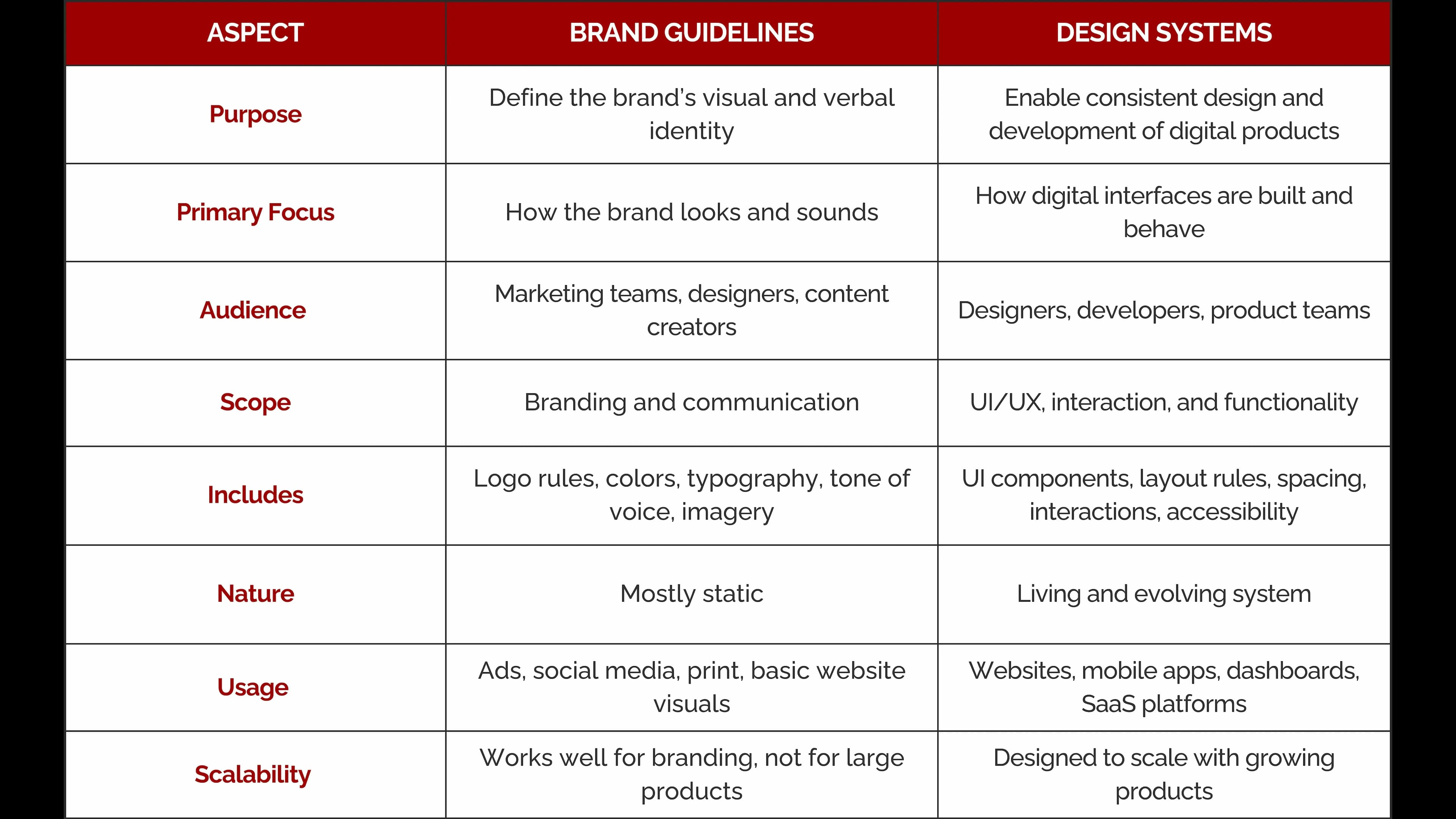
Design Systems vs. Brand Guidelines: The Core Differences
Let’s simplify this with a direct comparison.
Why Brand Guidelines Alone Are No Longer Enough
For modern digital businesses, brand guidelines alone simply don’t scale. Here’s why:
- Different designers create different UI elements
- Developers build components their own way
- Products start looking inconsistent
- User experience suffers
- Maintenance becomes expensive
Without a design system, every new feature feels like starting from scratch.
Example: Airbnb
Airbnb faced massive inconsistency as their product grew. Their solution was adesign system called Design Language System (DLS).
The result:
- Faster design and development
- Consistent user experience across platforms
- Stronger brand trust
- Easier collaboration between teams
Their brand guidelines set the tone. Their design system made it scalable.
How Design Systems and Brand Guidelines Work Together
This isn’t an “either/or” situation. The strongest brands use both.
Here’s How They Complement Each Other:
- Brand guidelines define the identity
- Design systems translate that identity into usable components
- Marketing stays consistent
- Products stay usable and scalable
At Seven Koncepts, we’ve seen firsthand how combining branding services with UI/UX design systems leads to stronger digital experiences.
Benefits of Using Both
When businesses invest in both brand guidelines and design systems, they benefit from:
- Faster product launches
- Reduced design and development costs
- Stronger brand recognition
- Better user experience
- Easier team collaboration
- Long-term scalability
This is especially critical for startups, SaaS platforms, and growing enterprises.
SEO Insight: Why This Matters for Your Digital Presence
Consistency impacts more than design, it affects SEO and user behavior too.
- Consistent UX reduces bounce rates
- Clear interfaces improve engagement
- Scalable systems allow faster updates
- Strong branding improves trust signals
That’s why modern web design services, UI/UX design, and brand identity development should never exist in silos.
When Should You Invest in a Design System?
You should consider a design system if:
- You’re scaling your product or platform
- Multiple designers/developers are involved
- You’re launching web and mobile apps
- You want long-term consistency
You need brand guidelines if:
- You’re building or refreshing your brand
- You’re running marketing campaigns
- You want visual consistency across channels
How Seven Koncepts Helps
At Seven Koncepts, we don’t treat branding and design as separate silos. We help businesses build:
- Strong brand identities
- Scalable design systems
- User-focused UI/UX designs
- High-performance websites and digital products
Our approach ensures that your brand doesn’t just look good, it works everywhere.
Conclusion
If there’s one thing to remember, it’s this:
Brand guidelines define who you are. Design systems ensure you stay consistent as you grow.
In today’s digital-first world, you need both to build trust, scale efficiently, and deliver seamless experiences.
Ready to Build a Brand That Scales?
If you’re looking to create a brand that’s not only visually strong but also digitally scalable, Seven Koncepts is here to help. From brand identity to design systems and user-centric digital experiences, we build solutions that grow with you.
Get in touch with Seven Koncepts today and let’s design smarter together.
FAQs
1. What is the difference between brand guidelines and a design system?
The main difference between brand guidelines and a design system lies in their purpose. Brand guidelines define how a brand should look and sound, while a design system explains how digital products should be designed and built.
Brand guidelines focus on visual identity elements such as logos, colors, typography, and tone of voice. A design system includes reusable UI components, layout rules, interaction patterns, and often code to ensure consistency across websites and applications.
2. What are the five core elements of brand guidelines?
Although brand guidelines can vary from one company to another, most brand guideline documents include five core elements:
- Logo usage and placement rules
- Brand color palette and usage
- Typography and text hierarchy
- Tone of voice and messaging style
- Imagery and visual style
Together, these guidelines help maintain consistency across all brand touchpoints.
3. What is an example of a design system?
A well-known example of a design system is Google’s Material Design. It provides a complete framework for building digital interfaces, including UI components, layout rules, motion guidelines, and accessibility standards.
Other popular examples include Airbnb’s Design Language System (DLS) and Shopify’s Polaris, both of which help teams design and build consistent, scalable digital products.
4. What are the 4 C’s of branding?
The 4 C’s of branding are:
- Company – Who the brand is, including its mission, values, and strengths
- Category – The market or industry the brand operates in
- Competitors – Other brands offering similar products or services
- Consumers – The target audience and their needs, preferences, and behaviors
These four factors help brands understand their position in the market and build stronger, more effective branding strategies.
5. What are the key components of a design system?
The key components of a design system include:
- UI components such as buttons, forms, cards, and navigation
- Design tokens for colors, typography, spacing, and shadows
- Layout and grid systems
- Interaction patterns and animations
- Accessibility guidelines
- Clear documentation for designers and developers
A well-built design system ensures consistency, scalability, and efficiency across digital products.